It is clearly important to decompose large software systems into
hierarchies of smaller and more manageable entities. This
decomposition can have important consequences for implementation
related issues, such as compile-time and link dependencies,
configuration management, etc. A package is the grouping of related
components into a cohesive physical entity. A package is also the
minimal unit of software release.
In this chapter we describe the Gaudi package structure, and how
these packages are implemented in libraries. We also discuss
abstract inerfaces, which are one of the main design features of
Gaudi
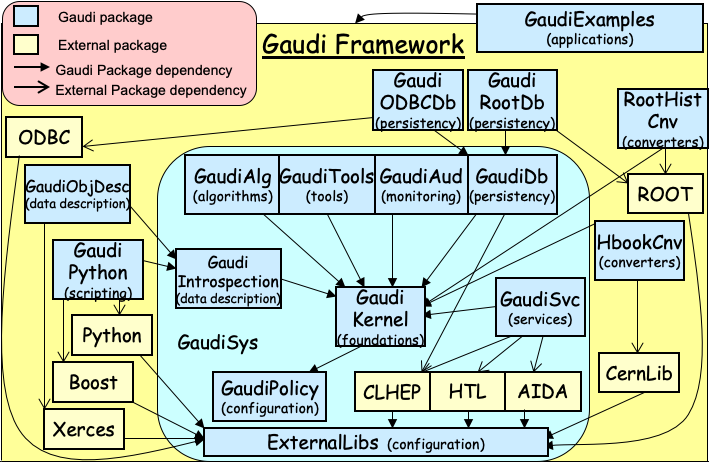
The Gaudi software is decomposed into the packages shown in Fig. 17.1.
Fig. 17.1 Package structure of the Gaudi software
At the lower level we find GaudiKernel, which is the framework
itself, and whose only dependency is on the GaudiPolicy package,
which contains the various flags defining the CMT [CMT]
configuration management
environment needed to build the Gaudi software. At the next level
are the packages containing standard framework components (GaudiSvc,
GaudiDb, GaudiTools, GaudiAlg, GaudiAud,GaudiIntrospection), which
depend on the framework and on widely available foundation libraries
such as CLHEP and HTL. These external libraries are accessed via CMT
interface packages which use environment variables defined in the
ExternalLibs package, which should be tailored to the software
installation at a given site. All the above packages are grouped
into the GaudiSys set of packages which are the minimal set required
for a complete Gaudi installation
The remaining packages are optional packages which can be used
according to the specific technology choices for a given
application. In this distribution, there are two specific
implementations of the histogram persistency service, based on HBOOK
(HbookCnv) and ROOT (RootHistCnv) and two implementations of the
event data persistency service (GaudiRootDb and GaudiODBCDb) which
understand ROOT and ODBC compliant databases respecively. There is
also a scripting service (GaudiPython) depending on the Python
scripting language and a data description service (GaudiObjDesc)
based on the Xerces XML parser. Finally, at the top level we find
the applications (GaudiExamples) which depend on GaudiSys and the
scripting and persistency services.
Packaging is an important architectural issue for the Gaudi
framework, but also for the experiment specific software packages
based on Gaudi. Typically, experiment packages consist of:
· Specific event model
· Specific detector description
· Sets of algorithms (digitisation, reconstruction, etc.)
The packaging should be such as to minimise the dependencies between
packages, and must absolutely avoid cyclic dependencies. The
granularity should not be too small or too big. Care should be taken
to identify the external interfaces of packages: if the same
interfaces are shared by many packages, they should be promoted to a
more basic package that the others would then depend on. It is a
good idea to discuss your packaging with the librarian and/or
architect.
One of the main design choices at the architecture level in Gaudi
was to favour abstract interfaces when building collaborations of
various classes. This is the way we best decouple the client of a
class from its real implementation.
An abstract interface in C++ is a class where all the methods are
pure virtual. We have defined some practical guidelines for defining
interfaces. An example is shown in Listing 17.1:
Listing 17.1 Example of an abstract interface (IService)
1#pragma once 2 3// Include files 4#include"GaudiKernel/IInterface.h" 5#include<string> 6 7// Declaration of the interface ID. (id, major, minor) 8staticconstInterfaceIDIID_IService(2,1,0); 910/* @class IService IService.h GaudiKernel/IService.h1112General service interface definition1314@author Pere Mato15*/1617classIService:virtualpublicIInterface{1819public:2021/// Retrieve name of the service22virtualconststd::string&name()const=0;23/// Retrieve ID of the Service. Not really used.24virtualconstIID&type()const=0;25/// Initilize Service26virtualStatusCodeinitialize()=0;27/// Finalize Service28virtualStatusCodefinalize()=0;29/// Retrieve interface ID30staticconstInterfaceID&interfaceID(){returnIID_IService;}31};3233#endif // GAUDIKERNEL_ISERVICE_H
From this example we can make the following observations:
· Interface Naming. The name of the class has to start with capital “I” to denote that it is an interface.
· Derived from IInterface. We follow the convention that all interfaces should be derived from a basic interface IInterface. This interface defined 3 methods: addRef(), release() and queryInterface(). This methods allow the framework to manage the reference counting of the framework components and the possibility to obtain a different interface of a component using any interface (see Section 17.3.2).
· Pure Abstract Methods. All the methods should be pure abstract (virtual ReturnType method(…) = 0;) With the exception of the static method interfaceID() (see later) and some inline templated methods to facilitate the use of the interface by the end-user.
· Interface ID. Each interface should have a unique identification (see Section 17.3.1) used by the query interface mechanism.
We needed to introduce an interface ID for identifying interfaces
for the queryInterface functionality. The interface ID is made of a
numerical identifier (generated from the interface name by a hash
function) and major and minor version numbers. The version number is
used to decide if the interface the service provider is returning is
compatible with the interface the client is expecting. The rules for
deciding if the interface request is compatible are:
· The interface identifier is the same
· The major version is the same
· The minor version of the client is less than or equal to the one of the service provider. This allows the service provider to add functionality (incrementing minor version number) keeping old clients still compatible.
The interface ID is defined in the same header file as the rest of
the interface. Care should be taken of globally allocating the
interface identifier (by giving a unique name to the constructor),
and of modifying the version whenever a change of the interface is
required, according to the rules. Of course changes to interfaces
should be minimized.
1staticconstInterfaceIDIID_Ixxx("Ixxx"/* id */,1/* major */,0/* minor */);23classIxxx:publicIInterface{4// ...56staticconstInterfaceID&interfaceID(){returnIID_Ixxx;}78};
The static method Ixxx::interfaceID() is useful for the implementation of templated methods and classes using an interface as template parameter. The construct T::interfaceID() returns the interface ID of interface T.
The method queryInterface() is used to request a reference to an
interface implemented by a component within the Gaudi framework.
This method is implemented by each component class of the framework
and allows us to navigate from one interface of a component to
another, as shown for example in Listing 17.2, where we navigate from the
IMessageSvc interface of the message service to its IProperty
interface, in order to discover the value of its “OutputLevel”
property.
Listing 17.2 Example usage of queryInterface to navigate between interfaces
The implementation of queryInterface() is usually not very visible
since it is done in the base class from which you inherit. A typical
implementation is shown in Listing 17.3:
Listing 17.3 Example implementation of queryInterface()
The implementation returns the corresponding interface pointer if
there is a match between the received InterfaceID and the
implemented one. The method versionMatch() takes into account the
rules mentioned in Section 17.3.1.
If the requested interface is not recognized at this level (line 9),
the call can be forwarded to the inherited base class or possible
sub-components of this component.
Two different sorts of library can be identified that are relevant
to the framework. These are component libraries, and linker
libraries. These libraries are used for different purposes and are
built in different ways.
Component libraries are shared libraries that contain standard
framework components which implement abstract interfaces. Such
components are Algorithms, Auditors, Services, Tools or Converters.
These libraries do not export their symbols apart from one which is
used by the framework to discover what components are contained by
the library. Thus component libraries should not be linked against,
they are used purely at run-time, being loaded dynamically upon
request, the configuration being specified by the job options file.
Changes in the implementation of a component library do not require
the application to be relinked.
Component libraries contain factories for their components, and it
is important that the factory entries are declared and loaded
correctly. The following sections describe how this is done.
When a component library is loaded, the framework attempts to locate
a single entrypoint, called getFactoryEntries(). This is expected to
declare and load the component factories from the library. Several
macros are available to simplify the declaration and loading of the
components via this function.
Consider a simple package MyComponents, that declares and defines
the MyAlgorithm class, being a subclass of Algorithm, and the
MyService class, being a subclass of Service. Thus the package will
contain the header and implementation files for these classes
(MyAlgorithm.h, MyAlgorithm.cpp, MyService.h and MyService.cpp) in
addition to whatever other files are necessary for the correct
functioning of these components.
In order to satisfy the requirements of a component library, two
additional files must also be present in the package. One is used to
declare the components, the other to load them. Because of the
technical limitations inherent in the use of shared libraries, it is
important that these two files remain separate, and that no attempt
is made to combine their contents into a single file.
The names of these files and their contents are described in the
following sections.
Components within the component library are declared in a file
MyComponents_load.cpp. By convention, the name of this file is the
package name concatenated with _load. The contents of this file are
shown below:
The complete set of statements that are available for declaring
components is given below. They include those that support C++
classes in different namespaces, as well as for DataObjects or
ContainedObjects using the generic converters.
Listing 17.5 The available component declaration statements
1. Declarations of the form DECLARE_GENERIC_CONVERTER(X) are used to declare the generic converters for DataObject and ContainedObject classes. For DataObject classes, the argument should be the class name itself (e.g. EventHeader), whereas for ContainedObject classes, the argument should be the class name concatenated with either List or Vector (e.g. CellVector) depending on whether the objects are associated with an ObjectList or ObjectVector.
2. Declarations of this form are used to declare components from explicit C++ namespaces. The first argument is the namespace (e.g. Atlfast), the second is the class name (e.g. CellMaker).
Components within the component library are loaded in a file
MyComponents_dll.cpp. By convention, the name of this file is the
package name concatenated with _dll. The contents of this file are
shown below:
1. The argument of LOAD_FACTORY_ENTRIES is the name of the component library.
17.4.1.4. Specifying component libraries at run-time
The fragment of the job options file that specifies the component
library at run-time is shown below.
Listing 17.7 Selecting and running the desired tutorial example
ApplicationMgr.DLLs+={"MyComponents"};[1]
Notes:
1. This is a list property, allowing multiple such libraries to be specified in a single line.
2. It is important to use the “+=” syntax to append the new component library or libraries to any that might already have been configured.
The convention in Gaudi is that component libraries have the same
name as the package they belong to (prefixed by “lib” on Linux).
When trying to load a component library, the framework will look for
it in various places following this sequence:
- Look for an environment variable with the name of the package, suffixed by “Shr” (e.g. ${MyComponentsShr}). If it exists, it should translate to the full name of the library, without the file type suffix (e.g. ${MyComponentsShr}=”$MYSOFT/MyComponents/v1/i386_linux22/libMyComponents” ).
- Try to locate the file libMyComponents.so using the LD_LIBRARY_PATH (on Linux), or MyComponents.dll using the PATH (on Windows).
These are libraries containing implementation classes. For example,
libraries containing code of a number of base classes or specific
classes without abstract interfaces, etc. These libraries, contrary
to the component libraries, export all the symbols and are needed
during the linking phase in the application building. These
libraries can be linked to the application “statically” or
“dynamically”, requiring a different file format. In the first case
the code is added physically to the executable file. In this case,
changes in these libraries require the application to be re-linked,
even if these changes do not affect the interfaces. In the second
case, the linker only adds into the executable minimal information
required for loading the library and resolving the symbols at run
time. Locating and loading the proper shareable library at run time
is done exclusively using the LD_LIBRARY_PATH for Linux and PATH
for Windows. The convention in Gaudi is that linker libraries have
the same name as the package, suffixed by “Lib” (and prefixed by
“lib” on Linux, e.g. libMyComponentsLib.so).
17.4.3. Library strategy and dual purpose libraries
Because component libraries are not designed to be linked against,
it is important to separate the functionalities of these libraries
from linker libraries. For example, consider the case of a
DataProvider service that provides DataObjects for clients. It is
important that the declarations and definitions of the DataObjects
be handled by a different shared library than that handling the
service itself. This implies the presence of two different packages
- one for the component library, the other for the DataObjects.
Clients should only depend on the second of these packages.
Obviously the package handling the component library will in general
also depend on the second package.
It is possible to have dual purpose libraries - ones which are
simultaneously component and linker libraries. In general such
libraries will contain DataObjects and ContainedObjects, together
with their converters and associated factories. It is recommended
that such dual purpose libraries be separated from single purpose
component or linker libraries. Consider the case where several
Algorithms share the use of several DataObjects (e.g. where one
Algorithm creates them and registers them with the transient event
store, and another Algorithm locates them), and also share the use
of some helper classes in order to decode and manipulate the
contents of the DataObjects. It is recommended that three different
packages be used for this - one pure component package for the
Algorithms, one dual-purpose for the DataObjects, and one pure
linker package for the helper classes.
Gaudi libraries and applications are built using CMT, but may be
used also by experiments using other configuration management tools.
17.4.4.1. Building and linking to the Gaudi libraries with CMT
Gaudi libraries and applications are built using CMT taking
advantage of the CMT macros defined in the GaudiPolicy package. As
an example, the CMT requirements file of the GaudiTools package is
shown in Listing 17.8. The linker
and component libraries are defined on lines 23 and 26 respectively - the linker
library is defined first because it must be built ahead of the
component library. Lines 28 and 34 set up the generic linker
options and flags for the linker library, which are suffixed by the
package specific flags set up by line 35. Line 31 tells CMT to generate the
symbols needed for the component library, while line 33
sets up the corresponding linker
flags for the component library. Finally, line 30 updates LD_LIBRARY_PATH (or
PATH on Windows) for this package. In packages with only a component
library and no linker library, line 30 could be replaced by
“apply_pattern packageShr”, which would create the logical name
required to access the component library by the first of the two
methods described in Section 17.4.1.4.
Listing 17.8 CMT requirements file for the GaudiTools package
Any library containing FORTRAN code (more specifically, code that
references COMMON blocks) must be linked statically. This is because
COMMON blocks are, by definition, static entities. When mixing C++
code with FORTRAN, it is recommended to build separate libraries for
the C++ and FORTRAN, and to write the code in such a way that
communication between the C++ and FORTRAN worlds is done exclusively
via wrappers. This makes it possible to build shareable libraries
for the C++ code, even if it calls FORTRAN code internally.